





Price: $179.99 - $159.99
(as of May 23, 2025 18:00:58 UTC – Details)
Product Description
The video showcases the product in use.The video guides you through product setup.The video compares multiple products.The video shows the product being unpacked. hero-video Merchant Video


1 Dual-Display Setup
2 Single-Display Setup


1 Optimized Layout
2 Magnetic Remote Button
3 Dual 4K@60Hz Display
4 Charging


1 Compatibility
2 Display Resolution
3 Ports
4 What’s in the Box
Model: A83K2
Model: A83K2
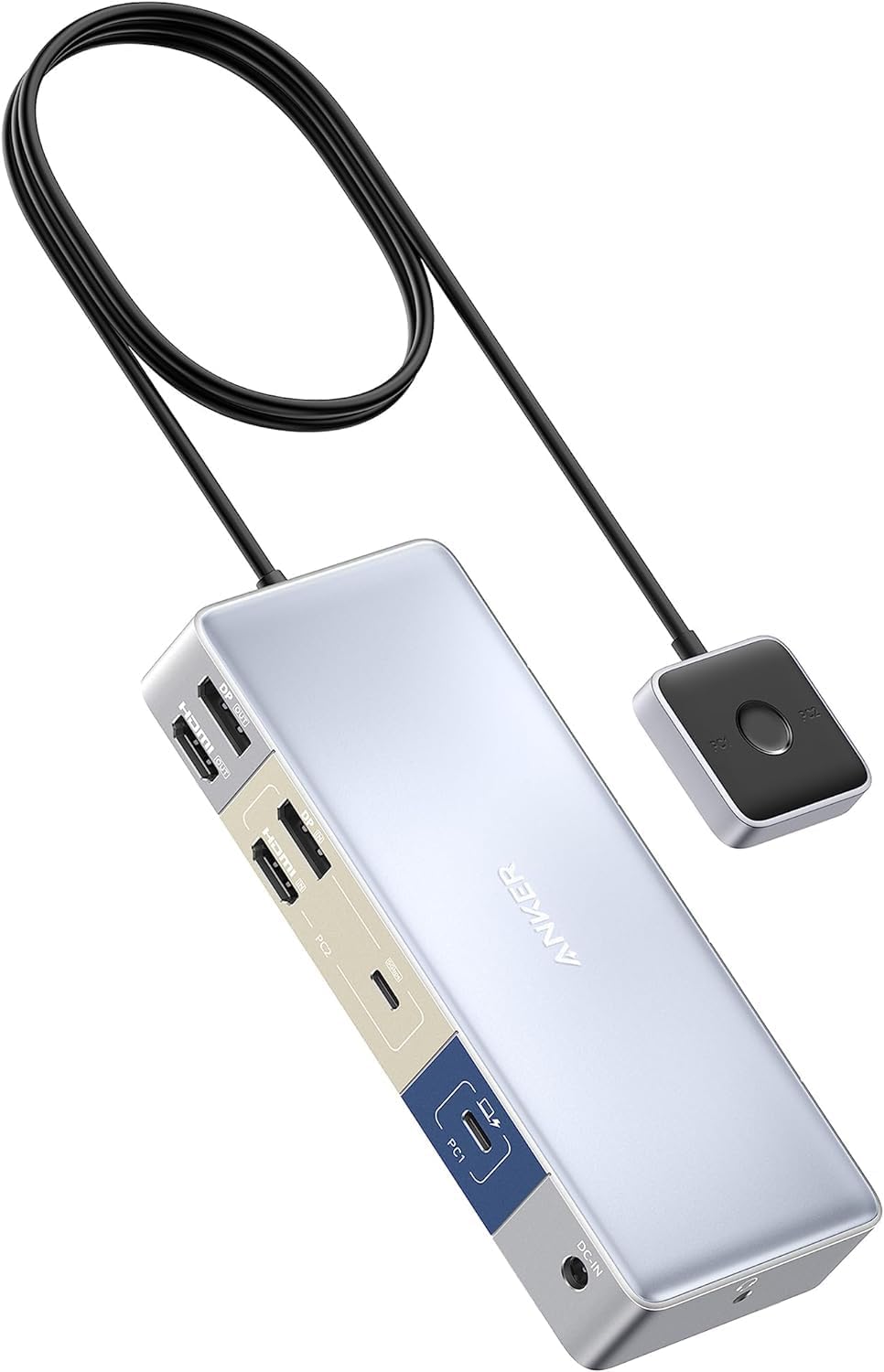
Anker 553 USB-C Docking Station (KVM Switch), One Docking Station for Your Desktop and Laptop Needs
Versatile Port Options: Connect, charge, and transfer data effortlessly with a wide array of ports, including 1 USB-C 3.0 port, 2 USB-A 3.0 ports, a USB 2.0 data port, an HDMI port, a DisplayPort, and a 3.5 mm AUX port.
Control at Your Fingertips: Switch between your desktop and laptop without leaving your seat using the magnetic remote, which can be conveniently attached anywhere or kept within reach using the included cable for ultimate accessibility.
Notes:
1. If you are using macOS on your computer, the displayed content will be mirrored. macOS only supports dual 4K@30Hz.
2. The USB-C devices must support Power Delivery, Display Port Alt Mode, and USB 3.2 with full functionality.
3. The included 4.9 ft / 1.5 m HDMI and DP cables are intended solely for input connection to the desktop PC and should not be used for connection to the display.
4. For stable screen mirroring, we don’t recommend using DisplayPort to HDMI or DisplayPort to Thunderbolt cables/adapters to connect the display.
5. If experiencing screen casting problems or USB connection issues, update your Windows graphics drivers or upgrade to the latest macOS version. Use the provided USB-C cables with your laptops for optimal KVM performance.
The video showcases the product in use.The video guides you through product setup.The video compares multiple products.The video shows the product being unpacked. hero-video Merchant Video
Seamless Switching: Enjoy effortless switching between devices with a single click, eliminating the need for constant cable changes. Share keyboards, monitors, mice, and other devices hassle-free.
Efficient Sharing of 5 Devices: Quickly share one audio device and four USB peripherals between your desktop PC and laptop, streamlining your workflow and enhancing productivity with ease.
Dual Media Display Brilliance: Immerse yourself in stunning 4K@60Hz resolution on dual monitors simultaneously, thanks to the DisplayPort and HDMI ports.(please make sure the USB C port of your laptpp supports display)
More Connections, More Possibilities: Experience the convenience of versatile ports, including 1 USB-C 3.0 port, 2 USB-A 3.0 ports, a USB 2.0 data port, an HDMI port, a DisplayPort, and a 3.5 mm AUX port.
What You Get: Anker 553 USB-C Docking Station (KVM Switch), 100W power adapter, 3.2 ft (1 m) USB-C Cable, 4.9 ft (1.5 m) HDMI Cable, DP Cable, USB-A to USB-C Cable, welcome guide, our worry-free 18-month warranty, and friendly customer service.
Customers say
Customers find the docking station great for switching between two laptops and appreciate its intuitive setup process and build quality. The functionality and speed receive mixed feedback – while some say it works perfectly with HDMI and switch quickly, others report it doesn’t work with laptops in clam mode and experience slow switching. The display port compatibility is particularly problematic, with multiple customers reporting that nothing displays on their monitors. The design receives negative feedback, with several customers describing it as poorly designed.
 Overview
 Processor
 Display
![]() RAM
RAM
 Storage
![]() Video Card
Video Card
 Connectivity
 Features
 Battery
 General
Related Products




Apple MacBook Pro 16″ M1 Pro
Out of stock
Reviews
Clear filtersThere are no reviews yet.