





Price: $39.99 - $35.99
(as of May 09, 2025 11:16:39 UTC – Details)
Product Description
The video showcases the product in use.The video guides you through product setup.The video compares multiple products.The video shows the product being unpacked. NEXAS NexLINK Bluetooth OBD2 Scanner Merchant Video
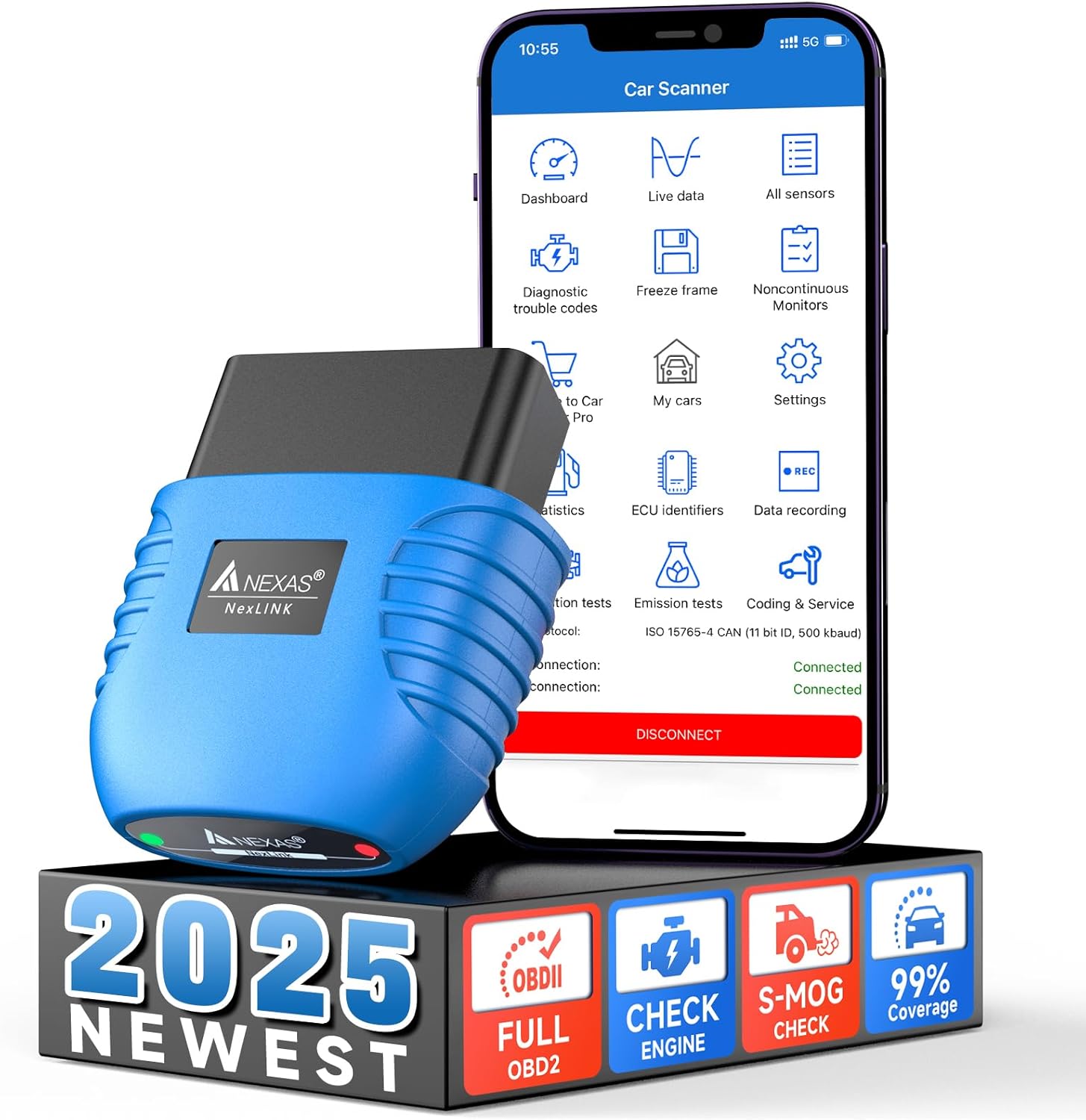
Why Choose the NEXAS NexLINK Bluetooth OBD2 Scanner ?
The health of your car affects your safety on the road, and regular checkups are very important. However, it often costs hundreds of dollars to go to the garage to check the cause of the breakdown and get information about your car, which is both costly and time-consuming. If you are an ordinary car owner who wants to know the performance of your car or investigate the cause of the breakdown, or you are keen on DIY car repair and want to get more functions at a low cost, then the NEXAS Nexlink Bluetooth OBD2 scannner will be your best choice.
Multi-functional Selection: It includes all 10 modes of the standard OBD2 scanner, making it easy to determine the cause of the check engine light. Supports vehicle performance tests, sensor readings and on-board diagnostic parameter identification (PID) data.Comprehensive OBD2 Diagnostic App: It is equipped with dozens of popular third-party diagnostic applications for you to choose from, which can be extended the functionality through different applications to easily achieve advanced diagnosis. Outstanding Compatibility: NEXAS Nexlink supports 12 types of vehicles that comply with the standard OBD2/EOBD protocol after 1996, including cars, vans, hybrids, light trucks, pickups, motorcycles and more. It also supports the latest 2024 model year.Available worldwide: Supported in English German Spanish Finnish French Italian Dutch Portuguese Chinese.


Dozens of Third-party Diagnostic Apps
NEXAS NexLINK is compatible with Android, iOS, Windows, and Mac (iOS supports Bluetooth LE, Android and Windows support Bluetooth) for dozens of third-party apps with more than a hundred features (App features depend on the developer, and some features may be available for a fee).
For iOS: CAR SCANNER ELM OBDII, DashCommand, Dr. Prius, FORScan, BimmerCode, BimmerLink, Leafspy, Harry’s LapTimer, OBD Auto Doctor, Carista OBDII, OBD Fusion, DashCommand, Carista OBDII, TrackAddict, InCarDoc, JScan, A Better Routeplanner (ABRP)For Android: Piston, HybridAssistant, Torque Lite, Torque Pro, AlfaOBD, CAR SCANNER ELM OBDII, DashCommand, Carista OBDII, OBD Fusion, DashCommand, BimmerCode, BimmerLink, OBD Auto Doctor, Leafspy, Dr. Prius, TrackAddict, Harry’s LapTimer, InCarDoc, FORScan A Better Routeplanner, JScan.For Windows & Mac: CAR SCANNER ELM OBDII, OBD Auto Doctor.
It is also offers coding for F/G series BMWs or Mini’s, battery health checks for hybrids such as Toyota/Lexus, and numerous motorcycle diagnostic features that no other Bluetooth scan tool can offer.
MOTOSCAN (Only Android): It is compatible with most BMW motorcycles (C, F, G, K, R, S, and Husqvarna series) with version 1.66 or higher.TuneECU (Only Android): It not only supports diagnosing BMW motorcycles but also Triumph, Aprilia, Benelli, Ducati & Moto Guzzi, Morini, Gilera, Husqvarna, KTM, BMW & CCM motorcycles. It allows users to read and clear fault codes, read IDs, real-time data, perform actuator tests, manage engine service intervals, codes, and adaptations, and perform other service functions.


Popular Compatible Third-party Apps for Car (Not Including All)
CAR SCANNER ELM OBD2 Real-time view of the car’s operating conditions, read car fault codes, car performance, sensor data and more! Dr. Prius Checks the health of your Toyota/Lexus hybrid’s high-voltage battery, provides HybridAssistant functionality for quick access to Toyota HSD information, and views internal engine parameters to optimize fuel efficiency. AlfaOBD Designed for Fiat Chrysler Automobiles (FCA) for 1994-2021 Fiat/Alfa Romeo/Lancia and 2005-2021 Chrysler/Dodge/Ram/Jeep vehicles. Reads and clears trouble codes, monitors real-time data, performs diagnostic tests, programs and configures vehicle control units, and adjusts specific vehicle parameters. BimmerCode Allows you to code the control units of your F/G series BMW or Mini. BimmerLink Reads all BMW or mini ECU fault codes, displays real-time sensor values, checks diesel particulate filter status and registers after a new battery. Torque Lite/Pro (Android only) Most popular OBDII performance and diagnostic tool forAndroid, support importing PIDs (get fault codes, sensor data and more) OBD Fusion Read DTCs and clear check engine lights, create custom dashboards, estimate fuel economy and more, plus enhanced diagnostics for selected vehicles. JScan It is powerful Jeep diagnostic application. Leafspy For Nissan Leaf owners to monitor the battery and other vehicle information normally visible only to the dealer. TrackAddict OBDII Live Monitor, Code Scanning / Reset, and Data Logging. Carista OBDII Diagnose, customize, and service your car, shows you a list of the fault codes stored in your vehicle, as well as their meanings.You can also reset the “Check Engine” light. (dealer-level technology for Audi, VW, Toyota, Lexus, BMW, etc. Other Apps Compatible with FORScan, InCarDoc, OBD Auto Doctor, DashCommand, HybridAssistant (only Android), Harry’s LapTimer, Piston and other APPs as well!
Does the Nexas Nexlink scan tool work with hybrid cars?
Yes, the Nexlink works with the HybridAssistant (Android only) and Dr. Prius (For Android, iOS) app that works with hybrid cars. Note: Include Toyota/Lexus hybrids, Ford hybrids, Hyundai/Kia hybrids, and Mitsubishi hybrids.
Can I buy this adapter even if I haven’t used OBD products before?
Of course you can, the Nexas Nexlink bluetooth scanner is user-friendly. Simply connect via Bluetooth and start the engine to begin vehicle diagnostics.
What should I do if the NEXAS device doesn’t appear in the Bluetooth list when I try to connect?
First, check if your app supports the brand of your car. Then, you can try restarting your phone to retrieve the Bluetooth signal source.
Why could not the app connect to the NEXAS device?
First, make sure the app is compatible with your car and phone. Second, make sure the app’s connection settings are correct. Third, delete and reinstall the app (especially after a system software update). Or try another app.
If I can’t connect to the vehicle/ECU, what should I do?
First, make sure the vehicle is OBD2 compatible and the device plug is not too loose. Second, the ignition switch should in the ON position (or restart). Third, make sure the vehicle’s OBD pins are not bent or short-circuited.
HEAR YOUR CAR’S VOICE: “Your car is ‘crying for help’ when the check engine light comes on, but you don’t understand exactly what your car’s trying to say? NEXAS NexLINK bluetooth OBD2 scanner acts as a translator—quickly reading/clearing fault codes, providing real-time data, and analyzing DTC definitions with its built-in library. Its s-mog test even simulates annual inspections, letting you troubleshoot at home, pass tests effortlessly, and save both time and money.
2-IN-1 CAR AND MOTORCYCLE OBD2 SCANNER: The normal bluetooth code reader is for cars only, NEXAS NexLINK bluetooth scan tool can be used for both cars and motorcycle! It works with the powerful Motoscan and TuneECU apps (Android only) to read and clear motorcycle fault codes, read ID and real-time data, perform tests, manage engine service intervals, code adaption and other diagnostic functions, making it possible to have two uses for a single device, saving you the money of buying another motorcycle scanner.
ENERGY SAVING: Battery Defender Mode activated! Our car reader scanner uses low-power technology. Its intelligent auto-sleep function stops power consumption the moment you switch off the ignition, helping maintain the car battery’s full charge. It has an over-voltage protection function that effectively prevents abnormal voltage during power connection. Even when vehicle voltage is abnormal, the built-in overload protection prevents circuit damage and ensures operational safety.
EXCELLENT COMPATIBILITY: This scanner for car uses the high-performance elm327 V2.X chip, which has faster communication speed compared to V1.5 and can support more car models, covering almost 99% of car brands. It supports dozens of third-party applications such as BimmerCode and BimmerLink, and can wirelessly connect to iOS or Android via Bluetooth 5.0, easily expanding its functionality to meet various diagnostic needs.If you enjoy DIY car repairs, then nexlink is definitely a cost-effective choice!
EASY TO USE: Our diagnostic scanner is compact and portable, plug and play! Simply connect to your mobile phone via bluetooth to monitor critical data such as battery readings, engine coolant temperature and vehicle speed in real time within a certain range inside or outside the vehicle. It displays car’s data stream in a clear graphical format instead of boring text. Even inexperienced users can easily compare fault readings with normal values to determine if the car needs servicing.
Customers say
Customers find the scan tool works well with recommended free apps and is easy to use, connecting quickly to devices. They appreciate its diagnostic capabilities, particularly its ability to check and clear codes, and consider it well worth the money. The build quality is good, and they like the battery life feature, with one customer noting it provides real-time readings on gas consumption. While some customers report fast communication speed, others mention connectivity issues with iPhones. The information quality receives mixed feedback, with customers appreciating the information options but finding the instructions complicated and vague.
 Overview
 Processor
 Display
![]() RAM
RAM
 Storage
![]() Video Card
Video Card
 Connectivity
 Features
 Battery
 General
Related Products




Apple MacBook Pro 16″ M1 Pro
Out of stock
Reviews
Clear filtersThere are no reviews yet.