





Price: $149.99 - $129.99
(as of Jun 05, 2025 05:18:56 UTC – Details)
Product Description
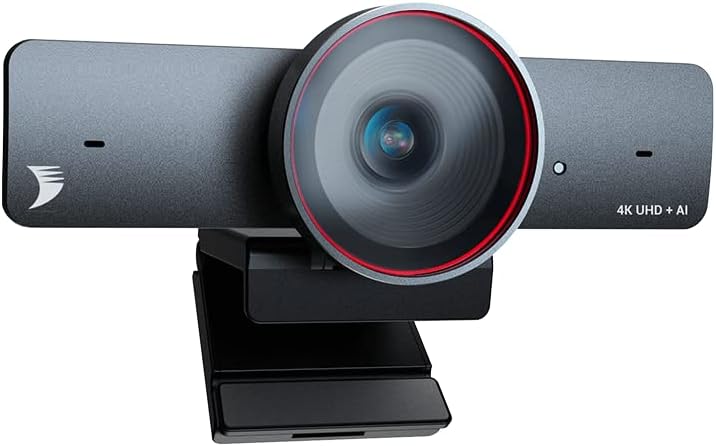
WyreStorm Focus 210 : Bring You to the Ultra-HD 4K & AI Powered Meeting
The video showcases the product in use.The video guides you through product setup.The video compares multiple products.The video shows the product being unpacked.

 Fit Everyone into Frame
With AI Framing, it automatically detects the people and center everyone into frame.
 Dual AI Noise-Cancelling Mics
Support a clear voice pick up within the distance up to 5m/16ft to ensure everyone could be heard.
 120° Wide-Angle Lens
Accurate and clear capture of your movement and muscle lines in a 120° wide field of view
 Track Your Steps as You Move
The camera can automatically follow you in real-time and ensure your image remains in the center.
 Zoom In or Out As You Want
You can adjust its field of view to be more narrow or wide to just focus on what you want
1 AI Framing
2 AI Noise-Cancelling
3 120° Field of View
4 AI Presenter Tracking
5 8x Digital Zoom

 APP Control
With the app control, you can adjust angle, fps, brightness, hue, contrast, saturation.
We sincerely recommend you using the latest version of our APP to imporve overall functions and significant features of webcam,which will provide you with a more premium using experience when use it.
How can I upgrade the camera to the latest version?
Firstly please download the FOCUS App and latest firmware at wyrestorm homepage. After install the App on computer, run it and open “Support” menu, then click “Upgrade” button to upload the firmware file.
The camera could be selected on application software but has no video output, how to check?
Please check if the camera has been occupied by another application software. For example, if the camera is previewed at FOCUS App, then 3rd party application like OBS or Zoom can not access the camera video.
Do I need to download any driver to use this camera?
No, the camera doesn’t need any driver. However, it’s highly recommended to download the FOCUS App and latest firmware at wyrestorm homepage to make full use of its functions.
What is presenter tracking and how can I use it?
Presenter Tracking automatically detects and tracks the presenter, who stands to present or naturally move on the stage. To use it, you can open the FOCUS App and select Presenter Tracking in the setting of Tracking Mode.
There is a system error “MSVCP140. dll is Missing” or “0xc00007b the application was unable to start ” , how to solve?
The error code represents that there is something corrupted within your Windows files or a DLL file from your application files is missing. Please download the DLL file to fix the issue.
4K Sharp Image: Real 4K webcam supports up to 30fps, providing crystal-clear video and a face-to-face meeting experience. Designed for your smooth communication and collaboration with your boss and teammates.
AI Framing & Tracking: With auto framing, the webcam detects attendees within its FoV and centers everyone into the frame automatically. With presenter tracking, it intelligently detects and follows the presenter that is moving around. FOCUS 210 brings you an immersive conference experience!
120° Ultra-wide Angle: FOCUS 210 webcam features a 120° ultra-wide field of view, ensuring everyone in the meeting room can be seen clearly. Get away from the embarrassment that everyone is crammed in front of a camera with a small FoV.
AI Noise-Canceling Mics: FOCUS 210 webcam has built-in dual AI noise-canceling mics to filter out wind noise, keyboard typing, and other environmental noises. It allows a straightforward voice pickup within a distance of up to 5m/16ft to ensure everyone can be heard.
Fully Certified & First-Class Service: We offer a 2-year warranty, 24/7 global service, and support. All of our products are FCC and CE-certified. A sound quality management system ensures professional-grade products. The app is also provided for AI tracking and video configuration. (Download on our official site or contact our tech support)
Soild Privacy Cover: We pay close attention to our customer’s privacy. Use the attached lens cover to guard your privacy effectively, and protect the camera lens from dirt and debris when not in use.
Universal Compatibility & Easy to Use: Clip the webcam onto your laptop or computer, just plug and play. Start your video conference readily on Zoom, Teams, Skype, BlueJeans, Cisco Webex, Google Meet, GoTo Meeting, etc.
Customers say
Customers praise the webcam’s 4K image quality, with one noting great clarity in varied lighting conditions, and appreciate its functionality, with one highlighting its effective presenter tracking and auto modes. They find the camera easy to set up, with one mentioning plug-and-play functionality across platforms, and like its audio features, with one noting the noise-canceling mics effectively filter out background noise. The zoom capability receives positive feedback, with one describing the wide angle view as impressive, and customers consider it good value for money. The quality aspect receives mixed reviews, with several customers describing it as a bad product.
 Overview
 Processor
 Display
![]() RAM
RAM
 Storage
![]() Video Card
Video Card
 Connectivity
 Features
 Battery
 General
Related Products




Apple MacBook Pro 16″ M1 Pro
Out of stock
Reviews
Clear filtersThere are no reviews yet.